Introduction | المقدمة
Have you ever opened your laptop and wished you had just one more screen?
Maybe you are working on a spreadsheet while keeping your email open, editing a video while checking your script, researching a project while writing notes, or gaming from somewhere that does not have room for a full monitor setup.
That is exactly where a portable monitor can make a difference.
Unlike a traditional desktop monitor, a portable display is designed to travel with you. You can put it in a laptop bag, take it to a coworking space, use it at home, or carry it while travelling. Modern models can also offer impressive resolutions, USB-C connectivity, slim designs, and even high refresh rates for gaming.
For UAE professionals, creators, students, freelancers, and gamers, that flexibility can be especially useful. A second screen can turn a laptop into a much more comfortable workspace without permanently taking over your desk.
In this guide, Barakah Creative By Kanwal looks at what actually matters when choosing a portable monitor, which features are worth paying for, and what you should check before ordering one online.
Quick Check | نظرة سريعة
Looking for the best portable monitor UAE options?
Before buying, check these five things first:
- Screen size: 15.6 to 16 inches is a practical sweet spot for most people.
- Resolution: 1080p is fine for basic work, while 2K or 4K can be better for creators and detailed work.
- Connection: USB-C is convenient, but your laptop’s USB-C port must support video output.
- Refresh rate: 60Hz is enough for office work, while 120Hz, 144Hz, or 180Hz can be attractive for gaming.
- Weight and stand: A portable monitor is only useful if you will actually carry it.
Quick Answer: What Is the Best Portable Monitor UAE Option?
There is no single portable monitor that is perfect for everyone.
For office work and productivity, prioritize a lightweight 15.6 or 16-inch display with USB-C.
For creators and designers, look for a higher-resolution panel, good colour coverage, and reliable connectivity.
For gaming, a higher refresh rate can make the experience noticeably smoother.
For travel, weight, thickness, built-in stand quality, and single-cable connectivity become more important.
Current buying guides also show that portable monitors are now available across several categories, including productivity, gaming, dual-screen setups, and wireless models.
Key Takeaways | أهم النقاط
- A portable monitor can turn a laptop into a flexible dual-screen workstation.
- USB-C is one of the most convenient connection options.
- Not every USB-C port supports video output, so check your laptop before buying.
- 15.6 to 16 inches is a practical size for most users.
- 2K resolution is a useful middle ground between 1080p and 4K.
- Gamers may benefit from 120Hz, 144Hz, or higher refresh rates.
- Creators should pay attention to resolution, colour coverage, brightness, and viewing angles.
- A good stand is just as important as the screen itself.
- Very cheap models can look attractive, but specifications and connectivity need careful checking.
A portable monitor can give you more screen space, but your laptop still needs enough power for creative work. See our guide to the Best Laptops for Graphic Designers in , tested for Photoshop, Illustrator, and video editing.
What Is a Portable Monitor? | ما هي الشاشة المحمولة؟
A portable monitor is essentially a lightweight external display designed to be carried alongside your laptop, tablet, or other compatible device.
Think of it as adding another screen to your setup without buying a permanent desktop monitor.
Some models are around 15 to 16 inches, while larger portable displays are also available. Current UAE listings include 16-inch 2.5K displays with USB-C connectivity, slim designs, and high colour coverage.
The real advantage is flexibility.
You can use one screen for your main task and the second for:
- Research
- Video calls
- Editing timelines
- Documents
- Coding
- Social media
- Gaming
- Reference material
That can save you from constantly switching between windows.
Best Portable Monitor UAE: What Should You Look For?
Screen Size
For most people, 15.6 to 16 inches is the sweet spot.
It is large enough to be useful but still small enough to carry with a laptop.
If you travel frequently, avoid choosing a huge portable display simply because the screen looks impressive.
Remember, you have to carry it.
Resolution
1080p
Full HD is perfectly adequate for:
- Office work
- Web browsing
- Documents
- Basic productivity
2K or QHD
A 2K portable monitor offers a noticeable step up in sharpness and is attractive for creators, photo work, editing, and people who simply want clearer text.
4K
4K makes more sense for users who specifically need high detail, such as photographers, video editors, and professional designers.
But don’t automatically assume that higher resolution is always better.
It can also mean higher cost and potentially greater power requirements.
Refresh Rate
If you mainly use your portable monitor for spreadsheets and documents, 60Hz is usually enough.
Gamers may prefer:
- 120Hz
- 144Hz
- 165Hz
- 180Hz
Higher refresh rates can make movement feel smoother, particularly in games.
Some current portable displays are going well beyond the traditional 60Hz category, including 180Hz models. That’s why gaming portable monitors have become a separate buying category.
USB-C Connectivity
USB-C can make portable monitor setup incredibly convenient.
With compatible hardware, one cable can carry video and power.
But there is an important catch.
Not every USB-C port supports video output.
Before buying, check whether your laptop supports DisplayPort Alt Mode or another compatible video-output standard through USB-C.
If it does not, you may need HDMI or another connection method.
This is one of the most important things to check before purchasing.
Buying Guide: How to Choose the Right Portable Monitor
For Remote Work and Productivity
Look for:
- 15.6 to 16 inches
- 1080p or 2K
- USB-C
- lightweight design
- comfortable stand
- matte or low-glare display
You don’t necessarily need a 4K 180Hz screen to answer emails and manage spreadsheets.
Spend your money where it improves your actual workflow.
For Content Creators
Creators should look beyond resolution.
Pay attention to:
- Colour coverage
- Colour accuracy
- Brightness
- Viewing angles
- Resolution
- Screen finish
If you’re editing photos or videos, a poor-quality display can make colour decisions difficult.
A 2K display with good colour performance can sometimes be more useful than an inexpensive 4K panel with poor colour accuracy.
For Gaming
Gaming changes the priorities.
Look for:
- High refresh rate
- Low response time
- Good connectivity
- QHD resolution if your hardware can handle it
- Adaptive-sync support where available
A high-refresh portable monitor can be particularly useful for gaming laptops because you can create a more flexible setup without carrying a traditional monitor.
For Travel
If travel is your priority, focus on:
- Weight
- Thickness
- Protective cover
- Built-in stand
- USB-C connectivity
- Power requirements
The best travel monitor isn’t necessarily the one with the biggest specification sheet.
It is the one you will actually put in your bag.
Looking for more interesting tech gadgets? You might also enjoy our guide to the Best RC Robot Dog in UAE, where we explore its AI features, voice control, remote operation, and interactive functions.
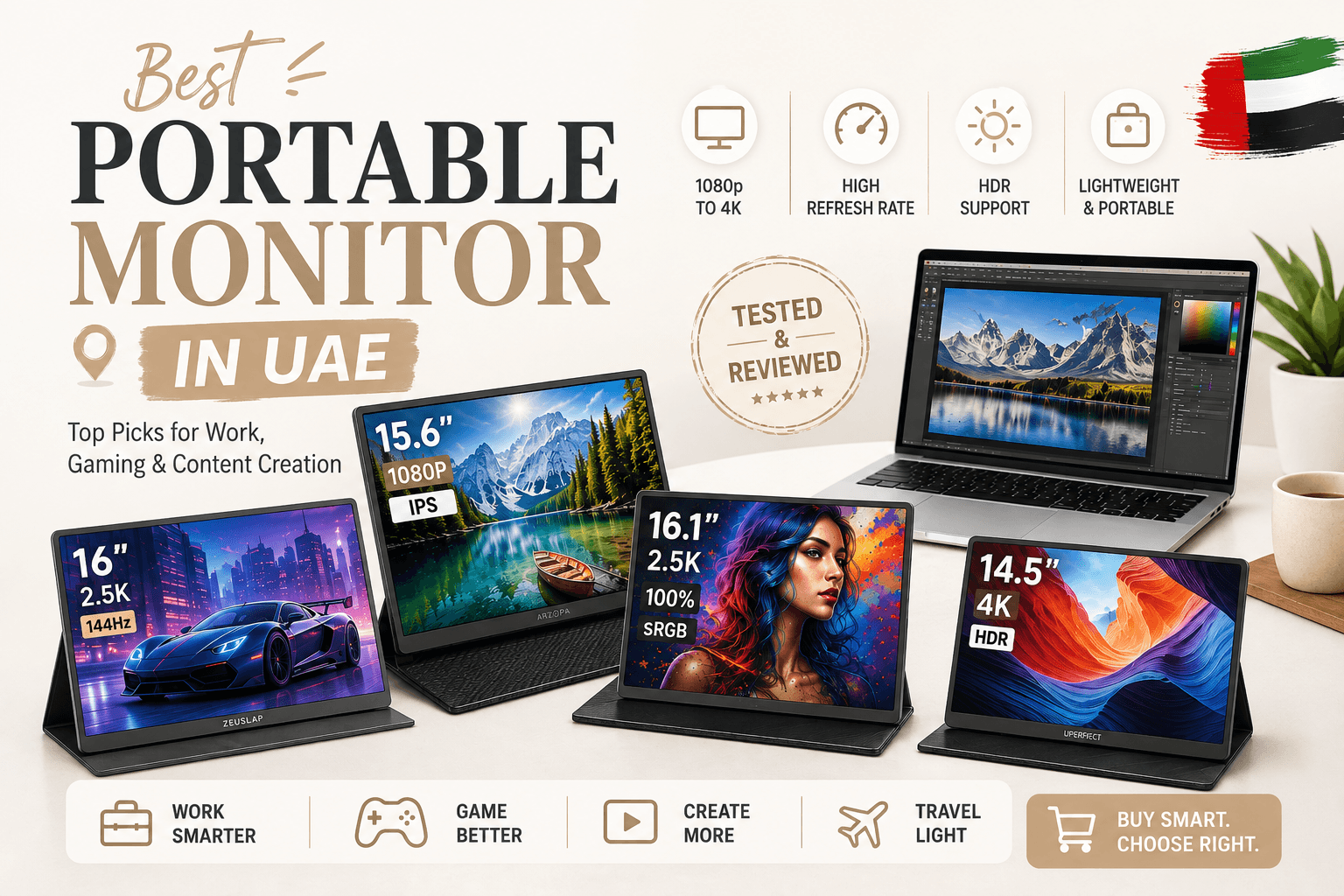
Portable Monitor Comparison: Our Top Picks
| Category | Actual AliExpress Product | Resolution | Refresh Rate | Best For |
|---|---|---|---|---|
| Best Budget / Office | HGFRTEE 15.6″ Portable Monitor | 1920 × 1080 | 60Hz | Office work & everyday productivity |
| Best for Creators | ARZOPA Z3FC 16.1″ Portable Monitor | 2560 × 1600 | Up to 180Hz | Creators, productivity & gaming |
| Best 4K Detail | UPERFECT 14.5″ Portable Monitor | 3840 × 2160 | 60Hz | Photo, video & detailed visual work |
| Best for Gaming | 16″ 2.5K Portable Gaming Monitor | 2520 × 1680 | Check selected variant | Gaming & entertainment |
Our Top Portable Monitor Picks
1. HGFRTEE 15.6″ 1080p Portable Monitor
Best for: Office work & everyday productivity
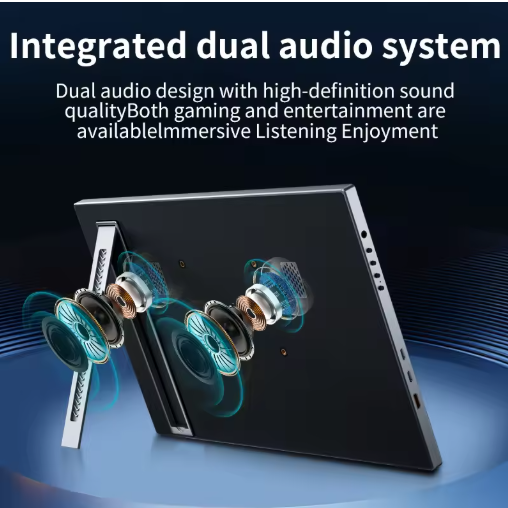
The HGFRTEE 15.6-inch portable monitor is a practical choice if your main goal is to add a second screen without making your setup complicated or expensive. Its Full HD 1920 × 1080 resolution and 60Hz refresh rate are well suited to everyday tasks such as documents, spreadsheets, browsing, email, online meetings, and general multitasking.
Its portable format also makes it useful for people who work from different locations. If you mainly need more screen space rather than advanced gaming or professional colour features, this type of 1080p monitor can offer a straightforward and convenient upgrade to a laptop setup.
2. ARZOPA Z3FC 16.1″ 2.5K Portable Monitor
Best for: Creators, productivity & gaming
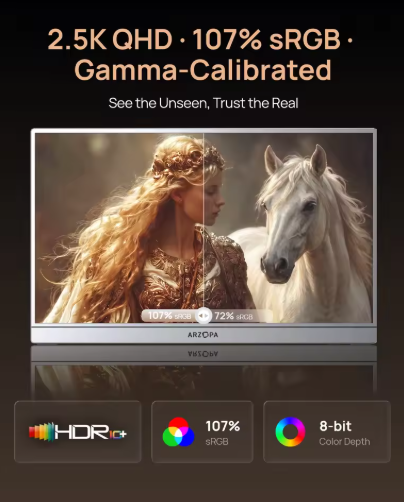
The ARZOPA Z3FC is a more performance-focused option for users who want more than a basic second screen. Its 16.1-inch display uses a 2560 × 1600 resolution and can support refresh rates of up to 180Hz, making it particularly interesting for people who move between creative work and entertainment.
The higher resolution can provide a sharper workspace for editing, research, and content creation, while the high refresh rate makes the monitor more appealing for gaming and smoother motion. For someone looking for one portable display that can handle both work and play, this is a more versatile option.
3. UPERFECT 14.5″ 4K Portable Monitor
Best for: Detailed visual work

The UPERFECT 14.5-inch 4K portable monitor is aimed at users who place a higher priority on image detail. With a 3840 × 2160 resolution and 60Hz refresh rate, it makes more sense for tasks where screen clarity matters than for users who simply need an inexpensive second display.
The compact 14.5-inch format also keeps it relatively travel-friendly, while the 4K resolution can be useful when working with detailed images, video, graphics, or other visually demanding content. If sharpness and detail are more important to
4. 16″ 2.5K Portable Gaming Monitor
Best for: Gaming & entertainment
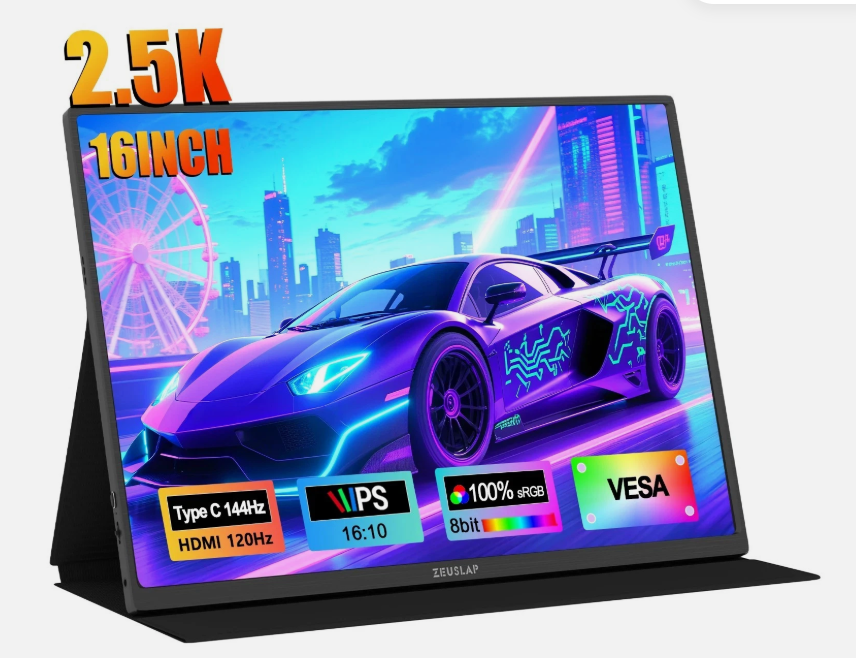
If gaming is your main reason for buying a portable monitor, this 16-inch 2.5K display is a more gaming-focused choice than a basic 60Hz portable screen. The higher-resolution display can deliver sharper visuals, while the larger 16-inch format gives you more room for games, movies, and other entertainment.
It is also a useful option for gamers who want a more flexible setup without carrying a traditional desktop monitor. Before ordering, check the exact refresh rate and connection options for the selected variant, as AliExpress listings can offer different configurations under the same product page.
Pros & Cons | المميزات والعيوب
Pros
- Adds a second screen to your laptop
- Easy to carry
- Useful for remote work
- Great for multitasking
- Convenient for travel
- Can improve productivity
- Some models support high refresh rates
- Available in several resolutions and sizes
Cons
- Some models require separate power
- USB-C compatibility can be confusing
- Very cheap displays may compromise quality
- Built-in stands are not always excellent
- Higher-resolution models can cost significantly more
- A larger display can reduce portability
Who Should Buy a Portable Monitor?
A portable monitor can be a fantastic upgrade if you:
Work From a Laptop
A second screen makes multitasking much easier.
Work Remotely
You can create a dual-screen setup in a coworking space, hotel, office, or home.
Create Content
Keep your editing software on one display while using the other for scripts, research, or previews.
Study
Use one screen for lectures or research and another for notes.
Travel Frequently
You get more screen space without carrying a desktop monitor.
Game on a Laptop
A high-refresh portable display can provide a larger or smoother gaming experience.
Maintenance Tips | نصائح العناية
Portable monitors are easy to maintain, but they still need proper care.
Keep the Screen Clean
Use a soft microfiber cloth. Avoid spraying liquid directly onto the display.
Protect the Display During Travel
Use the included cover or a suitable protective sleeve.
Avoid Extreme Heat
Do not leave your portable monitor inside a hot car for long periods, especially during UAE summer.
Protect the USB-C Ports
Avoid pulling the cable sideways or forcing connectors into the port.
Store It Flat
When you’re not using it, keep the monitor somewhere safe where it won’t be bent or crushed.
Common Mistakes to Avoid
Buying Without Checking USB-C Compatibility
This is probably the biggest mistake.
A USB-C connector does not automatically mean your laptop can send video through it.
Check your laptop specifications first.
Choosing 4K Just Because It Sounds Better
If you’re mainly answering emails, a 4K portable monitor may be unnecessary.
Ignoring Weight
A monitor that is too heavy may end up staying at home.
Forgetting the Stand
A great screen with a terrible stand can become frustrating very quickly.
Buying Based Only on Price
A very cheap monitor can look attractive until you discover weak brightness, poor viewing angles, limited connectivity, or unreliable build quality.
Safety Tips | نصائح السلامة
Always use the correct power and connection accessories recommended for your monitor.
Keep cables away from areas where they can be pulled or damaged.
When travelling, protect the screen from pressure inside your luggage.
And in the UAE, avoid leaving electronic devices exposed to extreme heat for prolonged periods.
If you notice unusual heat, flickering, damaged cables, or a swollen battery on a battery-powered model, stop using the device and follow the manufacturer’s safety instructions.
Best Portable Monitor UAE: Is It Worth Buying?
For the right person, absolutely.
A portable monitor doesn’t replace your laptop. It extends what your laptop can do.
That’s the real selling point.
If you regularly work with multiple windows, create content, study, travel, edit videos, manage websites, or play games, having a second display can make your workflow much more comfortable.
The category has also matured considerably. Current reviews cover portable monitors specifically for work, gaming, travel, Mac users, productivity, and even wireless setups.
If you’re building a content creation setup on a budget, don’t miss our guide to the Best TikTok Tools Under 100 AED in UAE featuring practical gadgets for filming, lighting, audio, and creating better content.
How Much Should You Spend?
There isn’t one perfect budget.
You can find basic Full HD portable monitors at relatively accessible prices, while 2K, OLED, touchscreen, and high-refresh models can cost considerably more.
For example, a current UAE listing for a 16-inch 2.5K portable monitor is around AED 499, showing that 2K portable displays are no longer restricted to premium pricing.
For AliExpress, however, don’t judge the deal only by the displayed price.
Check:
- Seller rating
- Number of orders
- Customer reviews
- Actual specifications
- Warranty information
- Shipping cost
- Estimated delivery
- Return policy
- Included accessories
What About Buying a Portable Monitor From AliExpress?
AliExpress can be attractive because it gives shoppers access to a huge range of portable displays, including less common configurations and high-refresh models.
But this is exactly where you should slow down before clicking Buy.
Look carefully at the seller’s history and product reviews.
A listing claiming “4K” or “180Hz” should not automatically be treated as better than a reputable 1080p or 2K model.
Compare the complete specification, not just the headline.
And remember that international shipping, return arrangements, warranty support, and delivery times can vary.
Final Thoughts | الخلاصة
A portable monitor is one of those tech accessories that sounds unnecessary until you actually use one.
Then suddenly, going back to a single laptop screen can feel frustrating.
For remote workers, creators, students, freelancers, gamers, and frequent travellers, the extra screen can make everyday tasks easier and more organized.
If you’re searching for the best portable monitor UAE shoppers can buy, don’t simply choose the model with the highest resolution or the biggest discount.
Choose the monitor that fits your workflow.
For office work, prioritize portability and USB-C simplicity.
For creators, pay attention to colour and resolution.
For gamers, look at refresh rate and response time.
And for travellers, remember that the best monitor is the one you’re actually willing to carry.
Barakah Creative By Kanwal aims to make tech shopping easier by focusing on practical use rather than simply throwing impressive specifications at you.
Frequently Asked Questions | الأسئلة الشائعة
Q. What is the best portable monitor UAE buyers can choose in the year?
A. The best choice depends on your needs. A 15.6 or 16-inch USB-C monitor is a strong all-round option for work and travel, while creators may prefer 2K or 4K and gamers may want a higher refresh rate.
Q: Is a portable monitor worth buying for a laptop?
A: Yes, especially if you multitask regularly. A portable monitor can give you a second screen for documents, research, email, editing, coding, or entertainment without requiring a permanent desk setup.
Q: What size portable monitor is best?
A: For most users, 15.6 to 16 inches provides a good balance between screen space and portability.
Q: Is 2K better than 1080p for a portable monitor?
A: 2K provides a sharper image and can be useful for creators and users who spend long hours reading or editing. However, 1080p can still be perfectly adequate for everyday productivity.
Q: Are portable monitors good for gaming?
A: Yes. Some portable gaming monitors now offer high refresh rates, making them suitable for gaming laptops and portable gaming setups.
Q: I connect a portable monitor to a MacBook?
A: Many portable monitors work with MacBooks through USB-C, but you should check the exact MacBook model and monitor requirements before buying.
Q: Does every USB-C portable monitor work with every laptop?
A: No. USB-C is a connector type, not a guarantee of video compatibility. Your laptop needs to support compatible video output through the USB-C port.
Q: Can a portable monitor work with a phone?
A: Some models can work with compatible smartphones that support external display output. Compatibility depends on the phone, operating system, monitor, and connection method.
Q: Are portable monitors good for content creators?
A: They can be very useful. Creators can use one screen for editing and another for scripts, research, timelines, previews, or communication.
Q: What refresh rate should I choose for gaming?
A: 60Hz is enough for basic gaming and productivity, while 120Hz, 144Hz, 165Hz, or 180Hz can provide smoother motion when your gaming hardware can take advantage of it.
Q: Is 4K worth it on a portable monitor?
A: It can be worthwhile for professional photo and video work where high detail matters. For normal office use, 1080p or 2K may offer better value.
Q: What should I check before buying a portable monitor on AliExpress or Amazon UAE?
A: Check the seller rating, order history, customer reviews, resolution, refresh rate, brightness, ports, USB-C compatibility, included accessories, shipping cost, delivery estimate, and return policy.
Q: Can I use a portable monitor as a second screen for work?
A: Yes. This is one of the main reasons people buy portable monitors. You can keep your primary application on the laptop and use the second screen for supporting information.
Q: Are portable monitors suitable for travel?
A: Yes. Their lightweight design makes them much easier to carry than conventional monitors. For frequent travel, prioritize a slim design, protective cover, reliable stand, and simple connectivity.
Q: What is the best portable monitor for remote work?
A: A lightweight 15.6 or 16-inch USB-C monitor with a good stand and at least Full HD resolution is a practical choice for remote work. If your work involves design, video, or detailed visuals, consider moving up to 2K.
About Barakah Creative By Kanwal | عن Barakah Creative
Barakah Creative By Kanwal creates practical UAE-focused guides covering technology, digital life, career resources, shopping ideas, and useful products for everyday life.
Our goal is simple: help you make better decisions without making the internet more confusing.
Explore more guides and recommendations on the Barakah Creative homepage.
Affiliate disclosure: Some product links in this article may be affiliate links. If you purchase through an affiliate link, Barakah Creative may receive a commission at no additional cost to you. We aim to recommend products based on usefulness, specifications, value, and relevance to our readers.
🌍 Written for Every Soul
Barakah Creative by Kanwal is written for every human living in, working in, or building a life in the UAE. This space is for Emiratis and expats alike — for anyone who calls this country home, hope, or a new beginning.
No labels. No limits. Just real guidance for real people.
With sincerity and purpose,
Kanwal | Barakah Creative
Supporting career growth and clarity in the UAE
Quick review with practical feedback to help you get hired faster
🇦🇪 🇸🇦 🇰🇼 🇧🇭 🇶🇦 🇴🇲 🇵🇰 🇮🇳 🇵🇭 🇧🇩 🇪🇬 🇬🇧 🇺🇸 🇨🇳 🇳🇵 🇱🇰 🇮🇩 🇲🇾 🇯🇴 🇱🇧 🇹🇷 🇫🇷 🇩🇪 🇨🇦 🇦🇺 🇿🇦 🇳🇬 🇰🇪 🇹🇿 🇺🇬 🇬🇭 🇯🇵 🇰🇷 🇹🇭 🇻🇳 🇵🇸